

Guide to Setting Up eSIM on Samsung Galaxy & Android — Step by Step


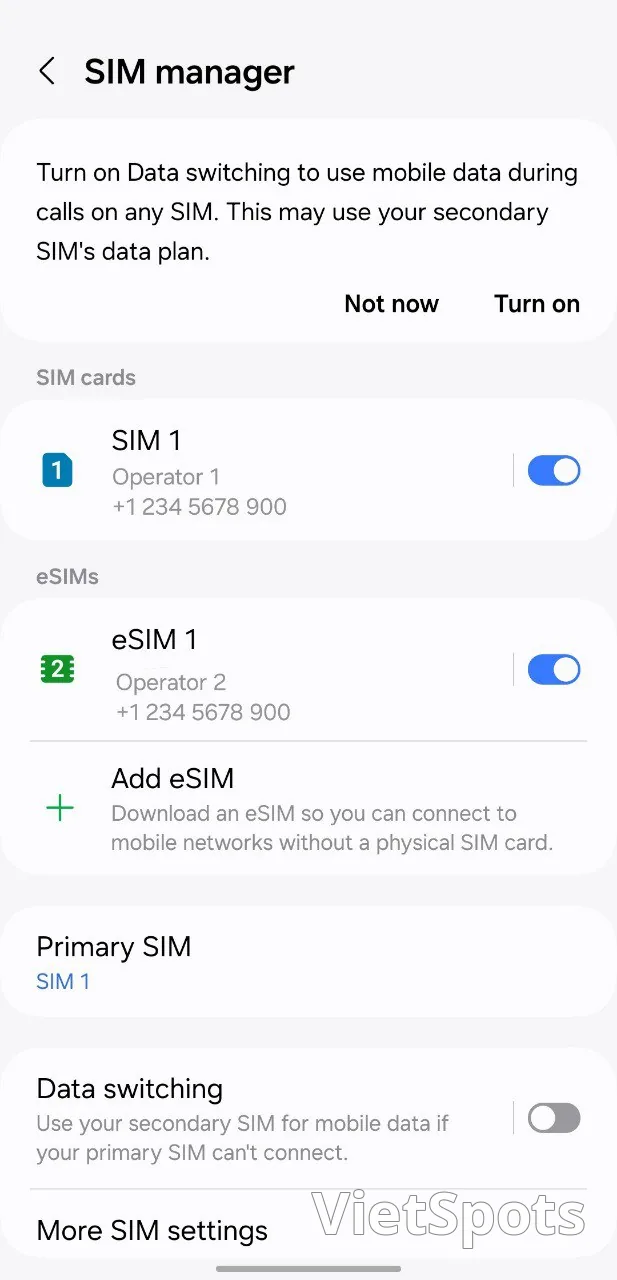
Most Samsung Galaxy S20 and later phones, as well as Google Pixel 3 and later, support eSIM. The setup process is a bit different from the iPhone, but it's still simple, taking only about 3-5 minutes.
Step 1 — Check if the device supports eSIM: Go to Settings → About phone → Status information → find the "IMEI" section — if you see 2 IMEI numbers, the device has eSIM. Another way: go to Settings → Connections → SIM manager, if there's an option "Add eSIM" or "Download SIM" then it's supported.
Step 2 — Buy and get QR: Download the Airalo/Saily/Holafly app from Play Store, select the Vietnam package, and pay. QR code appears in "My eSIMs" or is sent via email.
Step 3 — Add an eSIM to your device: On Samsung: open Settings → Connections → SIM manager → Add eSIM → Scan QR code from service provider. Point the camera at the QR code (from another device or a printed email). The device will automatically download the eSIM profile within 30-60 seconds. Name it "Vietnam Travel" and assign a color to make it easy to recognize. On Google Pixel: Settings → Network & internet → SIMs → Download a SIM instead.
Step 4 — Activate upon arriving in Da Nang: Go to SIM manager, switch "Mobile data" to eSIM Vietnam. Turn on "Roaming" for that eSIM (this is a necessary setting for travel eSIMs on Android). Turn off data for the main SIM to avoid charges.
Step 5 — Test the connection: Open Chrome and go to google.com; if it loads, it means it's successful. Check the remaining data in the app or Settings → Connections → Data usage → Mobile data usage.
If you encounter an error: No signal received — restart the device after installation. Can't access the internet — check the APN, for Viettel it's "v-internet", for Vinaphone it's "m3-world". Make sure "Data roaming" is turned on for the eSIM.
👉 Buy an eSIM Vietnam for Samsung/Android: Choose the data plan that suits your Da Nang trip at VietSpots eSIM Vietnam — receive the QR code by email, follow the 5 steps above and you're done in 5 minutes.
Samsung travel eSIM — just a few minutes, your data is always ready.
Travel Vietnam with VietSpots, in English
- 🎁 Sign up and get 19 Welcome Pack coupons — e.g. Motorbike Rental 45%
- 👑 Member tier discount up to 15% on site (Silver 5% · Gold 15%)
- 🛂 Auto-fill arrival card📶 Compare lowest eSIM prices🚻 Find toilets
Comments