

Delivery in three steps
Menus are translated for you, and orders arrive at the place you're staying. Only venues that deliver are listed.
- 1
Step 1
Pick a venue that delivers
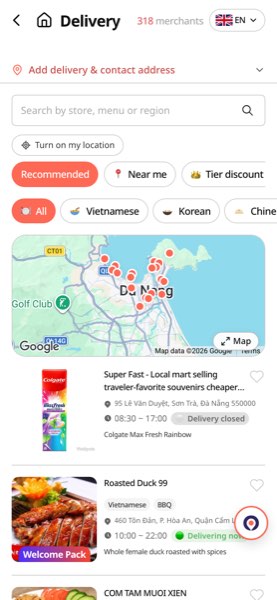
'Delivery' lists only venues taking delivery orders. See them on the map and narrow by 'open now', 'tier discount venues' or cuisine. A 'closed for delivery' tag means they aren't taking orders right now.
- 2
Step 2
Add items to the cart
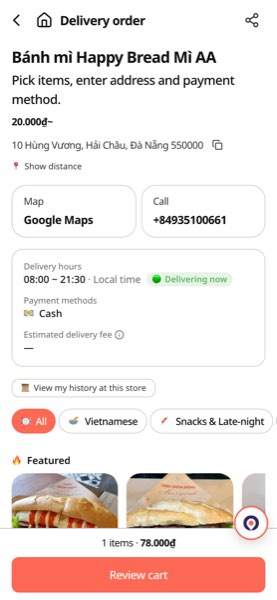
Item names and descriptions are translated. Tap a photo for details, tap 'Add' and the cart builds up at the bottom. You can leave a note per item (spice level, to-go and so on).
- 3
Step 3
From the cart: address and payment
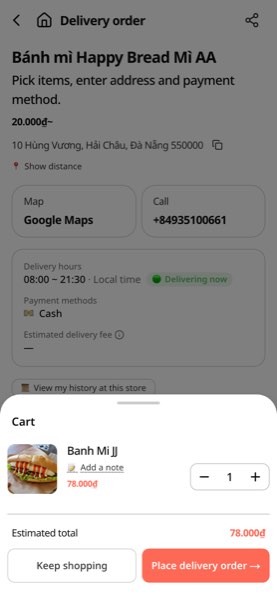
In the cart you see the subtotal and how much is left for free delivery, then tap 'Place delivery order'. The next screen takes your stay's address, contact and delivery time, then payment — save the address once and it fills itself next time.
Tip
After ordering, accepted · cooking · on the way · delivered update in real time. Turn on 'booking & order notifications' to get each step.
Browse delivery venues