

Get your tier discount from the store page button
Silver members and above get an in-store discount at partner venues. It all runs from one button on the store detail page.
- 1
Step 1
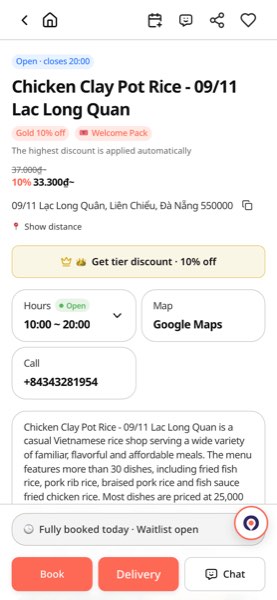
Tap 'Get tier discount' on the store page
Near the top of a store page (restaurant, massage and more) you'll see a button like '👑 Get tier discount · 10%'. The number is what your tier gets at this store. No button means the store doesn't run in-store tier discounts. If you're signed out, a sign-in prompt appears first.
- 2
Step 2
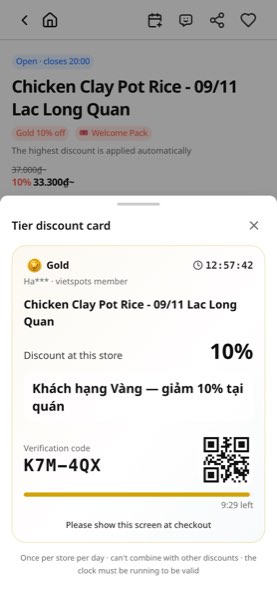
Your tier card opens
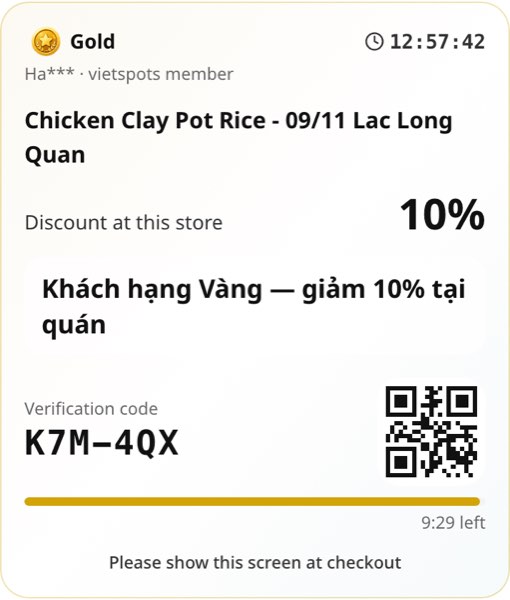
One screen shows your tier, this store's discount and a 6-character confirmation code. The card is valid for 10 minutes and the bar counts down. A Vietnamese line for the staff is printed on the card.
- 3
Step 3
Show the screen to the staff when you pay
Show the card before payment; the staff check the confirmation code and apply the discount. Once per store per day, and it can't be combined with other discounts or coupons.
Tip
Your tier is calculated automatically from your community activity score over the last 12 months. See how many points are left in 'My tier'.
See my tier